Oryon Inspection Start Free Trial

2026 buyer’s guide · Rental inspections

Best Property Inspection Apps (2026)

Choose for the way your inspections happen: on site with an inspector, remotely with a resident, or across a property management team. Compare reports, signatures, and the work each AI tool actually performs.

Reviewed September 12, 2026 · Published by Oryon Inspection, one of the products included.

Start with your operation

Who will perform the inspection?

You or your inspector

Look at Oryon for item documentation and dashboard coordination, or myInspections for reusable checklists and report sharing.

Your resident

Explore RentCheck for organized resident-led inspections and Walktru for a guided rental walkthrough and move-out record.

A larger operations team

Consider HappyCo for multifamily operations, SnapInspect for configurable workflows, and Property Inspect for detailed field reporting.

These are starting points based on the workflows described below, not exclusive use cases or a performance ranking.

How to use this guide

Compare the handoff, not just the feature name.

Evidence & reports

Can a reader locate the item, understand its condition, and see the relevant photos together? Ask to see an exported report, not only a feature list.

Review & signatures

Check who can review, who signs, how links reach participants, and what happens when a report needs a correction.

AI & field work

Distinguish text editing, voice capture, photo analysis, and automation. Test generated output, and confirm connectivity and plan requirements for your workflow.

Sources, scope, and how these recommendations were made

We reviewed the official vendor pages linked with each app on September 12, 2026. Competitor entries describe published capabilities; we have not performed a hands-on benchmark of every product. Oryon examples are supplied product demonstrations using sample records. Recommendations are editorial assessments of workflow fit, not independent awards or measured performance results.

“Not verified” means the reviewed source did not establish a capability. It does not mean the product lacks it. Confirm current plans, AI allowances, integrations, offline behavior, and the required signature process with each vendor before purchase.

At a glance

Property inspection app comparison

On smaller screens, scroll horizontally to compare all columns. Source links and buying considerations are in the app profiles below.

Workflow, reports, signature process, and AI capabilities reviewed September 12, 2026
App Working model Reports & signatures AI capability
Oryon Inspection Mobile app + web dashboard PDF; participant signature links Text correction; photo-based item details and possible defect observations
RentCheck Guided resident workflow Inspection review; confirm required signing flow AI Damage Assist for review prioritization
HappyCo Onsite team workflow Reports; documented signature workflow Voice notes, ratings, and photo organization
SnapInspect iOS, Android + web Reports; confirm required signing flow AI reports, voice workflows, and automation
Property Inspect Mobile + web workflow Inspection reports; verify sign-off setup Photo-based descriptions, conditions, and summaries
myInspections Mobile + web admin Reports; electronic signatures Not verified in the reviewed source
Walktru Guided tenant workflow PDF records; signatures Not verified in the reviewed source

Seven options, different priorities

Build your inspection app shortlist.

Consider it when you want to

Inspect yourself or coordinate an inspection team

Oryon Inspection

Mobile item documentation, a web dashboard, participant signature links, and the two AI tools demonstrated below.

Before choosing: Try your own inspection, review the generated fields, and check the plan’s included features before choosing.

Consider it when you want to

Organize resident-led inspections

RentCheck

Guided inspections, templates, automated scheduling, and AI Damage Assist for reviewing possible damage.

Before choosing: Confirm the resident completion process, required property-management integration, and sign-off requirements for your operation.

Consider it when you want to

Connect inspections with multifamily operations

HappyCo

Voice AI can turn spoken observations into notes and ratings and organize photos. HappyCo also documents report signatures.

Before choosing: Scope the inspection and maintenance modules you need and confirm availability of the AI workflow in your proposed setup.

Consider it when you want to

Configure inspection and maintenance workflows

SnapInspect

Its AI offering describes photo-backed reports, voice-powered inspections, and workflow automation across property operations.

Before choosing: Ask for a demonstration of your report template, approval steps, and signature requirements; confirm which features are included.

Consider it when you want to

Build detailed reporting and field workflows

Property Inspect

InspectAI documents photo-based descriptions, conditions, captions, section summaries, and report summaries.

Before choosing: Review the credit model and which report sections the AI can populate. Check your required field and approval workflow in a demo.

Consider it when you want to

Use reusable checklists and share reports

myInspections

The published features include templates, condition checklists, photos and video, offline inspections, and electronic signatures.

Before choosing: Run a sample with your preferred templates and report recipients. AI functionality was not established from the feature page reviewed.

Consider it when you want to

Run a tenant-led move-in and move-out record

Walktru

The rental walkthrough product supports room photos, notes, condition ratings, signatures, comparisons, and PDF records.

Before choosing: Review its per-lease purchase model and the tenant access-code workflow. AI functionality was not established from the page reviewed.
Oryon Inspection in action

See what the AI changes.

Oryon supports move-in, move-out, and periodic inspections. These sample records show two distinct AI tools within a cooking-range item. They demonstrate the workflow, not a benchmark against other apps.

Correct a written observation

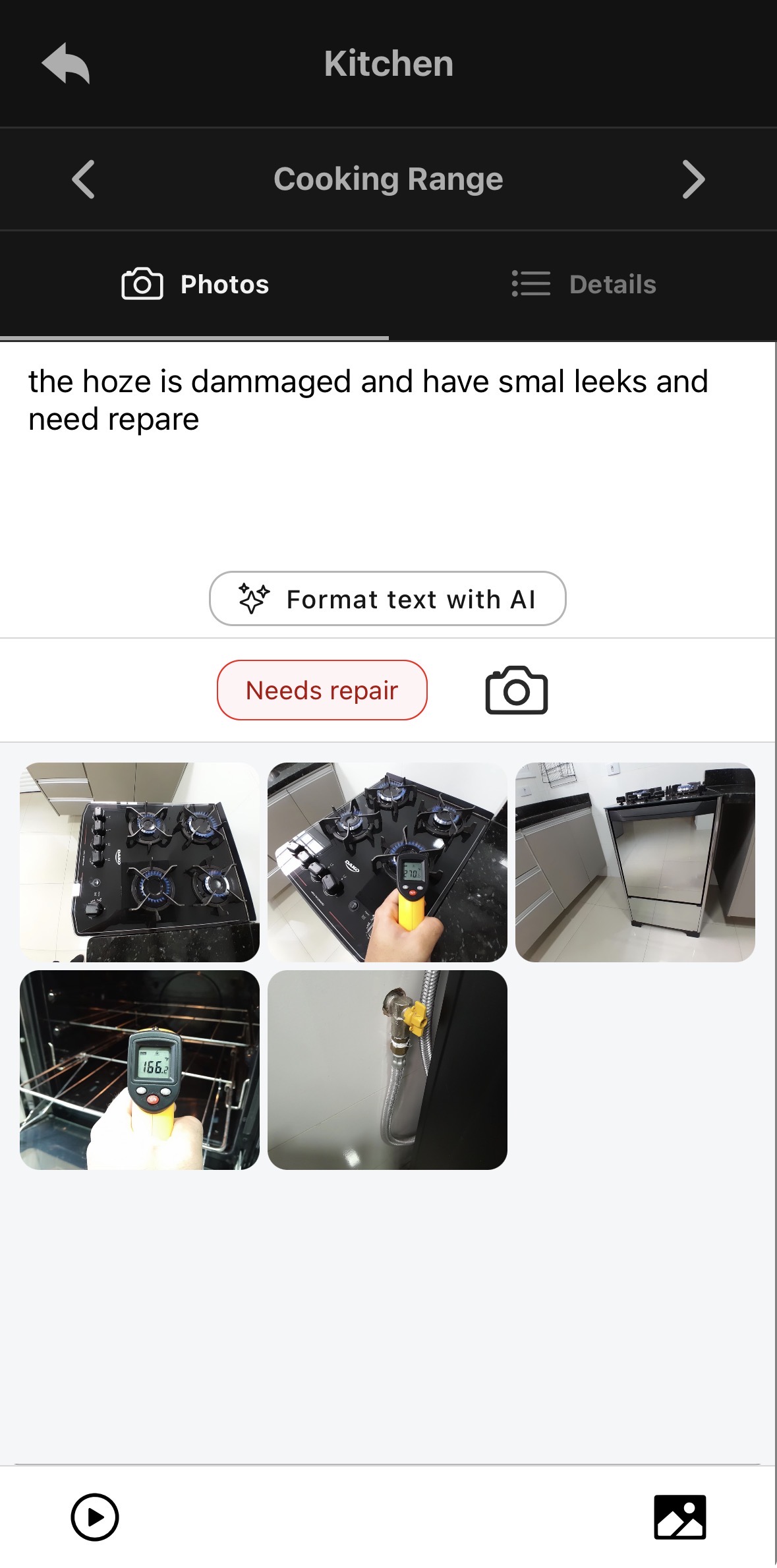
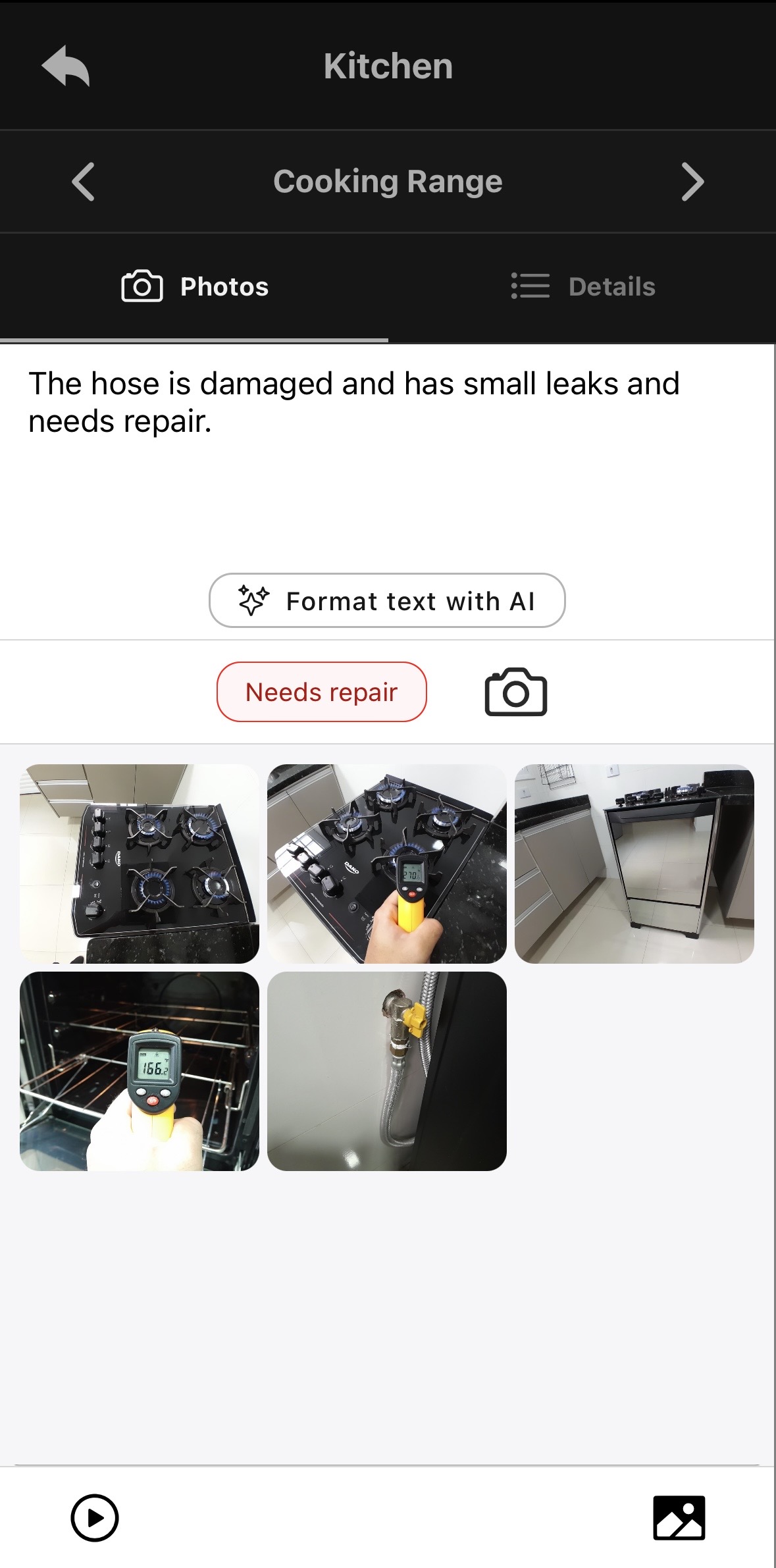
Format text with AI corrects the wording already entered by the inspector. Compare the original note with the resulting observation.

The damage and leak statements were present in the original note. This is a writing example, not evidence of a leak detected from photographs.

Original inspection observation with spelling and grammar errors
Before · The inspector’s original note.
The same inspection observation after Format text with AI
After · The corrected wording in the observation field.

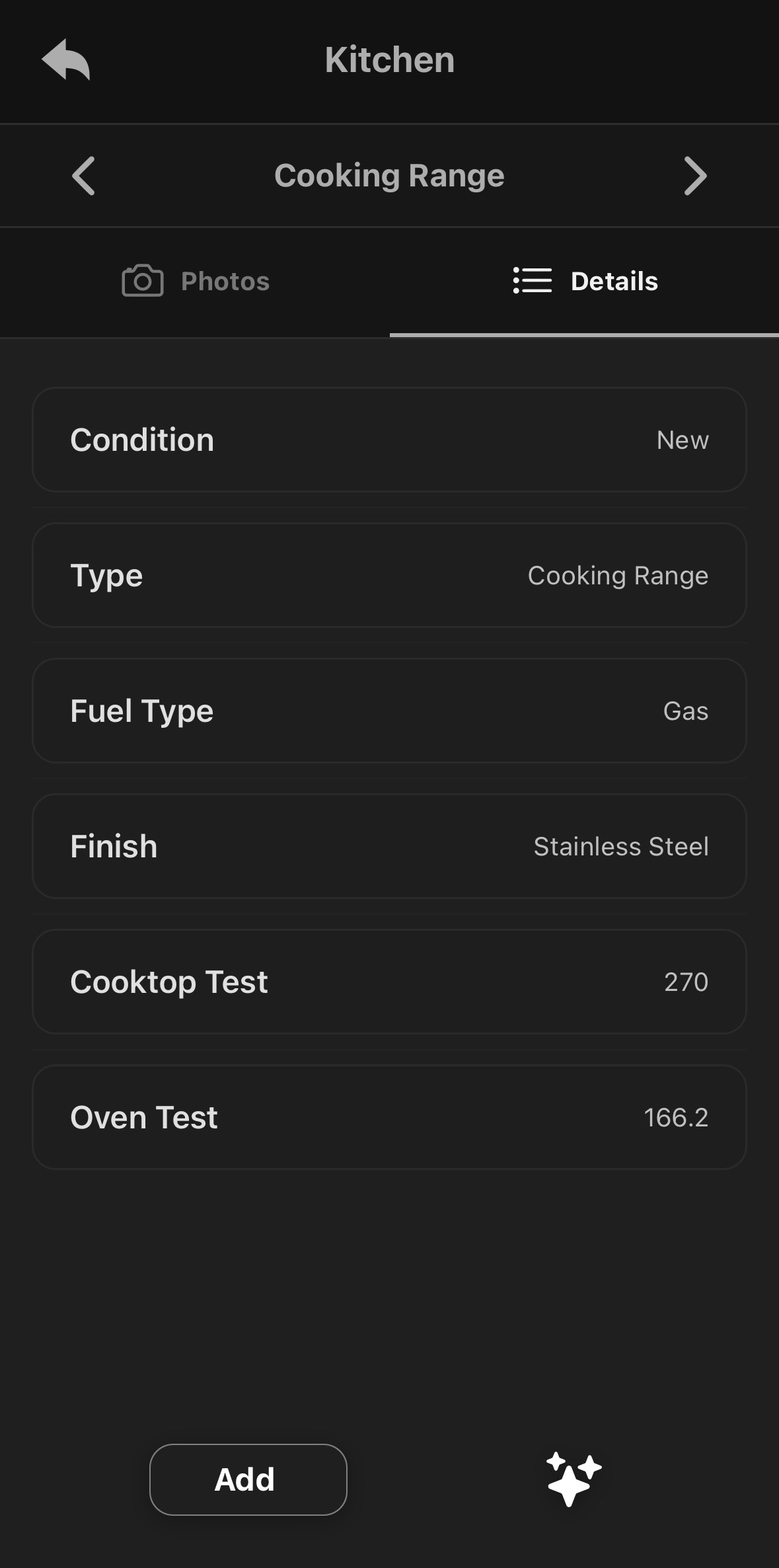
Populate item details from selected photos

Choose 2–6 photos and use Generate with AI. The app fills details such as type, fuel, finish, and condition. It can also populate observations when analysis identifies possible visible defects.

Review the generated fields against the item. This screenshot shows the details output; it does not show an automatically generated defect observation. AI output can be incomplete or incorrect.

See the full AI workflow and controls →

Cooking Range details populated after AI photo analysis
Generated details · Review the condition, type, fuel, finish, and recorded values.

Follow the record through to the report.

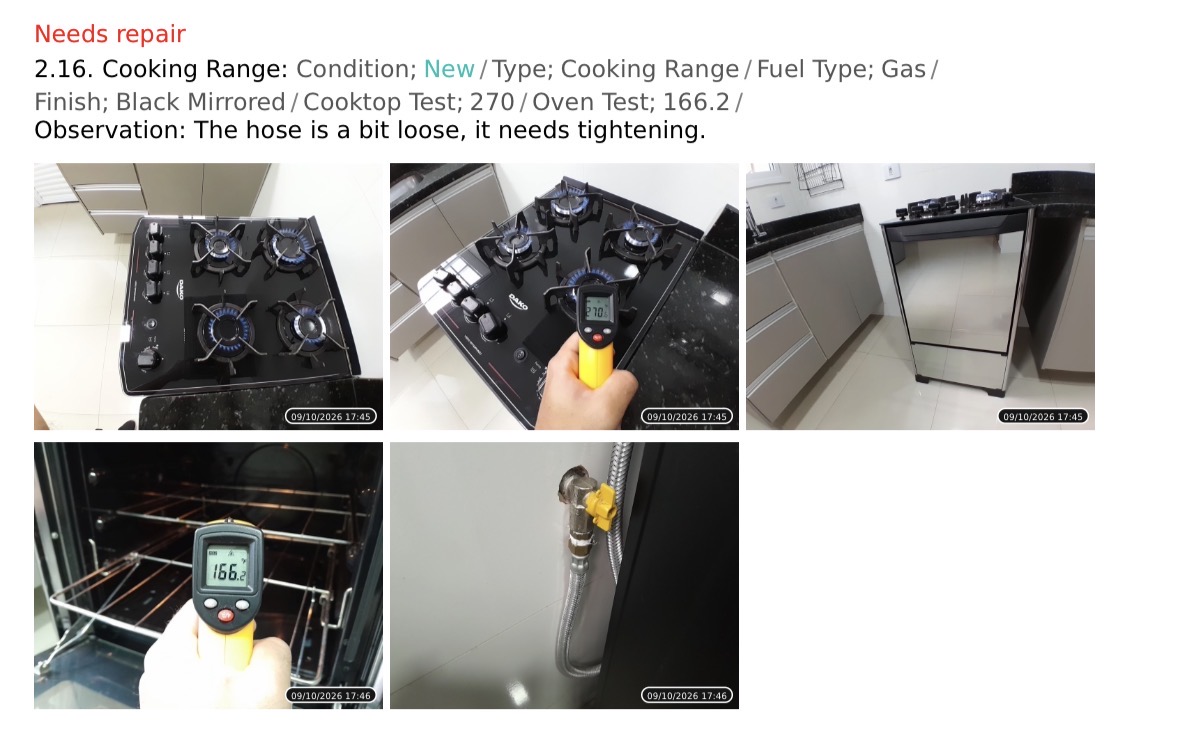
This separate report example shows how Oryon groups the item’s details, observation, repair flag, and photos in the PDF. The dashboard also provides scheduling, completion activity, and participant signature links.

Explore the mobile app, reports, and dashboard →

Separate Oryon report example combining a cooking-range observation and its photos
A separate inspection record, shown as a PDF entry.

Questions before choosing

Make the shortlist work for you.

What is the best property inspection app?

Choose based on who inspects, how the report is reviewed, and how it connects to the rest of your operation. This guide highlights options for inspector-led, resident-led, and broader team workflows. Run a sample inspection before committing.

Is Oryon the only app here with AI?

No. RentCheck, HappyCo, SnapInspect, and Property Inspect also describe AI capabilities in their official materials. The tasks differ: compare text correction, voice capture, photo analysis, and automation separately.

Does Oryon handle both move-in and move-out?

Yes. Oryon supports move-in, move-out, and periodic inspections. The examples on this page demonstrate particular features using sample inspection records.

Do all signature features work the same way?

No. Check whether signatures happen on site or through participant links, who needs an account, and when the signed report becomes available. Ask each vendor to demonstrate the process you need.

What should I test during a trial?

Inspect one room, attach photos to an item, enter an observation, review any AI output, export the report, and try the required signature process. If multiple people inspect, test the dashboard handoff too. Compare actual plan costs and usage limits for your volume.

Try your own inspection workflow

See whether Oryon
fits the way you work.

Document a room, review the report, and explore the AI tools using your own inspection process.